VMenuCell
V-MenuCell is a wrapper around ViewCell that can be used as a list item in TableSection, typically serving as a menu option.
Basic Usage
The default style of V-MenuCell is:
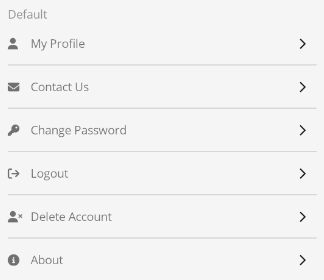
Set the MenuText property to specify the menu text content and the IconText property to specify the icon. The icon format can be a Unicode character or an icon name.
By binding the Command and CommandParameter properties, you can trigger a command when clicking a menu item.
<TableView Intent="Settings"
Grid.Row="1"
RowHeight="50"
IsVisible="{Binding IsAuthenticated}">
<TableRoot>
<TableSection Title="">
<control:VMenuCell MenuText="My Profile"
IconText=""
Command="{Binding MessageCommand}"
CommandParameter="ProfilePage"></control:VMenuCell>
<control:VMenuCell MenuText="Contact Us"
IconText=""
Command="{Binding MessageCommand}"
CommandParameter="ContactPage"></control:VMenuCell>
<control:VMenuCell MenuText="Change Password"
IconText=""
Command="{Binding MessageCommand}"
CommandParameter="UpdatePasswordPage"></control:VMenuCell>
<control:VMenuCell MenuText="Logout"
IsEnabled="{Binding IsAuthenticated}"
IconText=""
Command="{Binding GoSignOutCommand}"></control:VMenuCell>
<control:VMenuCell MenuText="Delete Account"
IconText=""
Command="{Binding MessageCommand}"
CommandParameter="DeleteAccountPage"></control:VMenuCell>
<control:VMenuCell MenuText="About"
IconText=""
Command="{Binding MessageCommand}"
CommandParameter="AboutPage"></control:VMenuCell>
</TableSection>
</TableRoot>
</TableView>
Without Icons
If IconText is not set, the icon will not be displayed.

<TableView Intent="Settings"
           Grid.Row="1"
           RowHeight="50"
           IsVisible="{Binding IsAuthenticated}">
    <TableRoot>
        <TableSection Title="">
            <control:VMenuCell MenuText="Bookings"
                               Command="{Binding MessageCommand}"
                               CommandParameter="OrdersPage?type=1"></control:VMenuCell>
            <control:VMenuCell MenuText="Reports"
                               Command="{Binding MessageCommand}"
                               CommandParameter="OrdersPage?type=2"></control:VMenuCell>
        </TableSection>
    </TableRoot>
</TableView>
Title Color
Set the MenuTextColor property to specify the color of the title and icon.

<TableView Intent="Settings"
Grid.Row="1"
RowHeight="50"
IsVisible="{Binding IsAuthenticated}">
<TableRoot>
<TableSection Title="">
<control:VMenuCell MenuText="Logout"
IsEnabled="{Binding IsAuthenticated}"
IconText=""
MenuTextColor="Red"
Command="{Binding GoSignOutCommand}"></control:VMenuCell>
<control:VMenuCell MenuText="Delete Account"
IconText=""
MenuTextColor="Blue"
Command="{Binding MessageCommand}"
CommandParameter="DeleteAccountPage"></control:VMenuCell>
<control:VMenuCell MenuText="About"
IconText=""
MenuTextColor="Green"
Command="{Binding MessageCommand}"
CommandParameter="AboutPage"></control:VMenuCell>
</TableSection>
</TableRoot>
</TableView>