VFormItem
Form item component.
Basic Usage
Set the TitleText property to specify the title of the form item.

<control:VFormItem TitleText="Company Name:">
</control:VFormItem>
A form item usually requires content.
Set the ContentSlot property to specify custom content for the form item.
Use the VEntry component to create an input field form item.

<control:VFormItem TitleText="Company Name:">
    <control:VFormItem.ContentSlot>
        <control:VEntry  />
    </control:VFormItem.ContentSlot>
</control:VFormItem>
Required Field
Set the IsRequired property to specify whether the form item is required. The default value is True.

<control:VFormItem TitleText="Company Name:"
                IsRequired="False">
</control:VFormItem>
Help Information
Set the HelpText property to specify help information for the form item.

<control:VFormItem TitleText="Company Name:"
                InfoText="Please fill in the buyer or client's information here">
</control:VFormItem>
When the HelpText property is set, a help button "?" will automatically appear at the far right of the title row. Clicking the button will display the help information.
Set the IsShowInfo property to hide the title and help information. This property supports two-way binding.
Hide Title and Help Information
Set the HideTitle and HideHelpText properties to completely hide the title and help information.
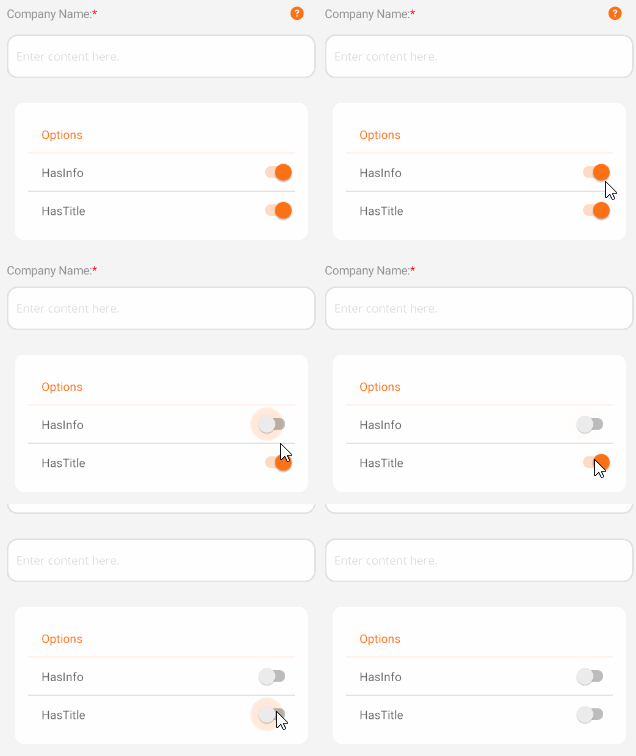
  <control:VFormItem TitleText="Company Name:"
                     HasInfo="{Binding HasInfo}"
                     HasTitle="{Binding HasTitle}"
                     InfoText="Please fill in the buyer or client's information here">
      <control:VFormItem.ContentSlot>
          <control:VEntry />
      </control:VFormItem.ContentSlot>
  </control:VFormItem>
Form Validation Information
Set the IsInvalid property to true to display validation messages. Use the InvalidText property to specify the validation message content.

 <control:VFormItem TitleText="Company Name:"
                    IsInvalid="False"
                    ValidateText="'Company Name' must not be null">
 </control:VFormItem>
Title Color
Set the TitleColor property to specify the title color.

<control:VFormItem TitleText="Company Name:"
                    TitleTextColor="Green">
</control:VFormItem>
Custom Content
Set the InfoSlot property to specify custom content for the help information. Setting this property will override the original help text.
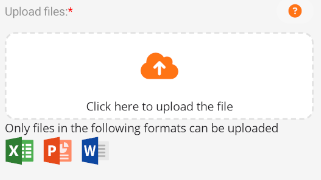
<control:VFormItem TitleText="Upload files:">
    <control:VFormItem.ContentSlot>
        <control:VUploader  />
    </control:VFormItem.ContentSlot>
    <control:VFormItem.InfoSlot>
        <VerticalStackLayout>
            <Label Text="Only files in the following formats can be uploaded"
                    />
            <HorizontalStackLayout HeightRequest="35" Spacing="10">
                <Image Source="xls.png"></Image>
                <Image Source="ppt.png"></Image>
                <Image Source="doc.png"></Image>
            </HorizontalStackLayout>
        </VerticalStackLayout>
    </control:VFormItem.InfoSlot>
</control:VFormItem>