VEntry
A commonly used text entry component.
Basic Usage
Basic text input usage

<control:VEntry></control:VEntry>
Placeholder Text
Set Placeholder to specify the placeholder text content.

<control:VEntry EntryPlaceholder="User Name"></control:VEntry>
Icon
Set EntryIconText to specify an icon. The format of the icon can be a Unicode character or an icon name. The default is empty.

<control:VEntry EntryIconText=""></control:VEntry>
Read-Only Mode
Make the text entry box read-only.
Set the EntryIsReadOnly property to True.

<control:VEntry EntryIsReadOnly="True"
                EntryText="Read Only Text !"></control:VEntry>
Password Entry
Use the EntryIsPassword property to create a password entry with a toggleable visibility option.

<control:VEntry EntryIsPassword="True"
                EntryText="Passw0rd!"></control:VEntry>
Input Length Limit
Use the EntryMaxLength property to set the maximum input length of the text box.

<control:VEntry  EntryMaxLength="8"
                    EntryText="12345678"></control:VEntry>
Prefix and Suffix
Use the ContentSlot and PrefixSlot properties to set prefix and suffix content for the text box.
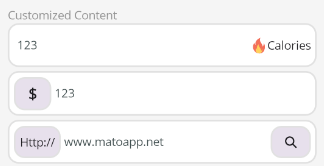
Suffix with Icon and Text
 <control:VEntry EntryText="123">

     <control:VEntry.ContentSlot>
         <HorizontalStackLayout HeightRequest="20">
             <Image Source="aze.png"
                    HorizontalOptions="Center"
                    VerticalOptions="Center"></Image>
             <Label Text="Calories"></Label>
         </HorizontalStackLayout>
     </control:VEntry.ContentSlot>
 </control:VEntry>
Prefix with Dollar Sign ($)
 <control:VEntry EntryText="123">

     <control:VEntry.PrefixSlot>
         <Border Margin="0,5"
                 Padding="15,5"
                 Background="{StaticResource SurfaceVariant}">
             <Label Text="$"
                    FontSize="18"
                    FontAttributes="Bold"
                    VerticalOptions="Center"></Label>
         </Border>
     </control:VEntry.PrefixSlot>
 </control:VEntry>
Prefix with URL and Search Icon
<control:VEntry EntryText="www.matoapp.net">
<control:VEntry.PrefixSlot>
<Border Margin="0,5"
Padding="5"
Background="{StaticResource SurfaceVariant}">
<Label Text="Http://"
VerticalOptions="Center"></Label>
</Border>
</control:VEntry.PrefixSlot>
<control:VEntry.ContentSlot>
<Border Margin="0,5"
Padding="15,5"
Background="{StaticResource SurfaceVariant}">
<Label
FontFamily="FontAwesome-Solid"
Text=""
VerticalOptions="Center" />
</Border>
</control:VEntry.ContentSlot>
</control:VEntry>