VValidatingEntry
带有校验功能的文本编辑框组件。
V-ValidatingEntry继承自 V-Entry
占位文本、图标、只读状态、密码框、输入长度限制、前缀和后缀与V-Entry相同。此处不再赘述。
基础用法
文本框失去焦点时,校验规则会自动执行。

EntryText属性需要绑定一个ValidatableObject<T>的对象。
<control:VValidatingEntry EntryText="{Binding Email}" />
ViewModel:
创建属性
private ValidatableObject<string> Email = new();
添加校验规则
Email.Validations.Add(new IsEmailRule<string> { ValidationMessage = "Email is invalid." });
校验规则由Validations属性提供,它由一组校验规则组成。
V-Control默认实现了以下几种校验规则:
public class IsEmailRule<T>public class IsNotNullOrEmptyRule<T>public class IsUserNameOrEmailRule<T>public class MaxLenRule<T>public class MinCountOfDigitRule<T>public class MinCountOfUpperLetterRule<T>public class MinLenRule<T>pubiic class LessThanRule<T>pubiic class MoreThanRule<T>
如果您需要自定义校验规则,创建一个继承IValidationRule<T>的类,并实现Validate()方法。
复合型校验规则
校验规则Validations属性可以添加多个校验规则,当多个校验规则都通过时,才认为校验通过。在文本框下方默认显示最上层的校验错误信息。
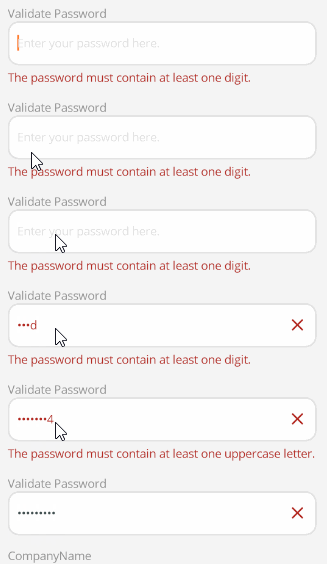
<control:VValidatingEntry EntryIsPassword="True"
                            EntryText="{Binding Password}"
                            EntryPlaceholder="Enter your password here."></control:VValidatingEntry>
ViewModel:
Password.Validations.Add(new MinCountOfDigitRule<string>() { ValidationMessage = "The password must contain at least one digit." });
Password.Validations.Add(new MaxLenRule<string>(16) { ValidationMessage = "The password cannot exceed 16 characters in length." });
Password.Validations.Add(new MinLenRule<string>(8) { ValidationMessage = "The password must be at least 8 characters long." });
Password.Validations.Add(new MinCountOfUpperLetterRule<string> { ValidationMessage = "The password must contain at least one uppercase letter." });
ValidateCommand
使用 ValidateCommand 属性,在触发校验时时,执行 ValidateCommand 指定的命令。
<control:VValidatingEntry EntryText="{Binding UserName}"
                            EntryPlaceholder="Enter your username or e-mail here."
                            ValidateCommand="{Binding ValidateUserNameCommand}"></control:VValidatingEntry>
在这个示例中,可以通过在 ValidateUserNameCommand 中,额外对UserName进行校验,实现“一票否决”或“一票同意”的效果。
ViewModel:
[RelayCommand]
private void ValidateUserName(object obj)
{
    if (UserName.Value != null && !string.IsNullOrEmpty(UserName.Value))
    {
        UserName.IsValid = true;
    }
    else
    {
        UserName.IsValid = false;
        UserName.Errors = new List<string>() { "UserName is required." };
    }
}